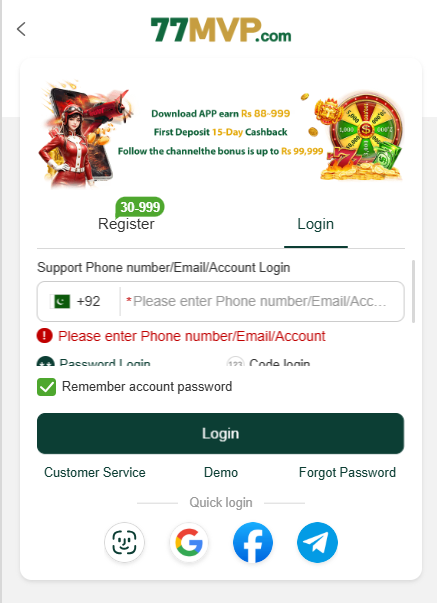
Getting into your 77MVP account is a pretty straightforward process once you know where to start. With just a few simple steps, you can access your account and explore the games and other features available on the platform. Whether you’re accessing 77mvp from your mobile phone or through a browser, the login process is designed to be simple and doesn’t take much time.
Still, it’s worth making sure you follow the right steps to avoid common login problems. Entering the wrong details, using an outdated app, or opening an incorrect website link can sometimes make things more frustrating than they need to be. Knowing how to access your account properly can save you time and help you avoid unnecessary issues.
In this guide, we’ll walk you through the basic login process so you know what to do when accessing your 77mvp account, whether you’re logging in for the first time in a while or simply returning to continue where you left off.
How to Login your 77mvp Account?
Open the official 77mvp app on your phone or visit the trusted website: https://bba56game.pk
Tap or click the clear “Login” button that usually sits right at the top of the screen for instant access.
Enter your registered phone number and the strong password you created during signup, then double-check for any typing mistakes.
If you have enabled it, simply use your fingerprint or face ID for lightning-fast entry without typing a single character.
Enter the one-time verification code sent to your phone or email when the system asks for extra security, especially on a new device.
Hit the login button and you will land straight on your personal dashboard where all the earning games and bonuses are waiting for you.
Solving Common Problems
Sometimes you may run into a small issue while trying to log in to your 77mvp account. Most login problems are relatively simple to troubleshoot, and a few quick checks may help you get back to the login page without much hassle.
Forgot Your Password? If you can’t remember your password, look for the “Forgot Password” option on the login page. Enter your registered phone number and follow the instructions provided to reset your password. If a verification code is required, make sure you enter the correct one.
OTP Not Arriving? If you’re waiting for an OTP and it hasn’t arrived yet, give it a few minutes. Sometimes network delays can affect message delivery. Check that your registered mobile number is correct, your phone has a stable signal, and try requesting another code if the option is available.
Account Locked After Multiple Attempts? Entering the wrong password several times may temporarily restrict access to your account. If this happens, check whether the login page offers an account recovery option. You can also contact the platform’s support team for assistance with verifying your account and restoring access.
Login Page Not Loading? If the website or login page isn’t opening properly, try refreshing the page or clearing your browser cache. Switching to a different internet connection or restarting your browser may also help. If you’re using the app, check whether an update is available.
Logging In From a New Phone? When you switch to a new mobile phone, you may need to sign in again using your existing account details. If the platform asks for additional verification, follow the instructions on the screen to confirm your access.
Still Getting an Error Message? If you’ve tried the basic troubleshooting steps but still can’t log in, double-check that you’re using the correct website or app. If the problem persists, contact support through a verified official channel and explain what happened so they can guide you further.